Built for Shopify merchants

Stop stockouts before
they cost you sales.

StockSense turns your Shopify sales, stock, incoming purchase orders, supplier lead times and sale plans into a clearer answer: what is at risk, what to reorder and when.

Daily velocity tracking Low-stock alerts Barcode stocktakes Purchase order management Supplier management

14-day free trial · Billed through Shopify · Cancel anytime · Explore every feature

app.stocksense.au — Stock Projection
StockSense Stock Projection screen showing stock on hand, sell-through, forecast demand, incoming stock and stockout risk for one SKU

One SKU, 90 days out: on-hand, incoming, forecast and reorder point in one view.

How it works

From install to insight
in minutes.

No manual setup, no CSV imports — just connect your Shopify store and go.

01 · Risk

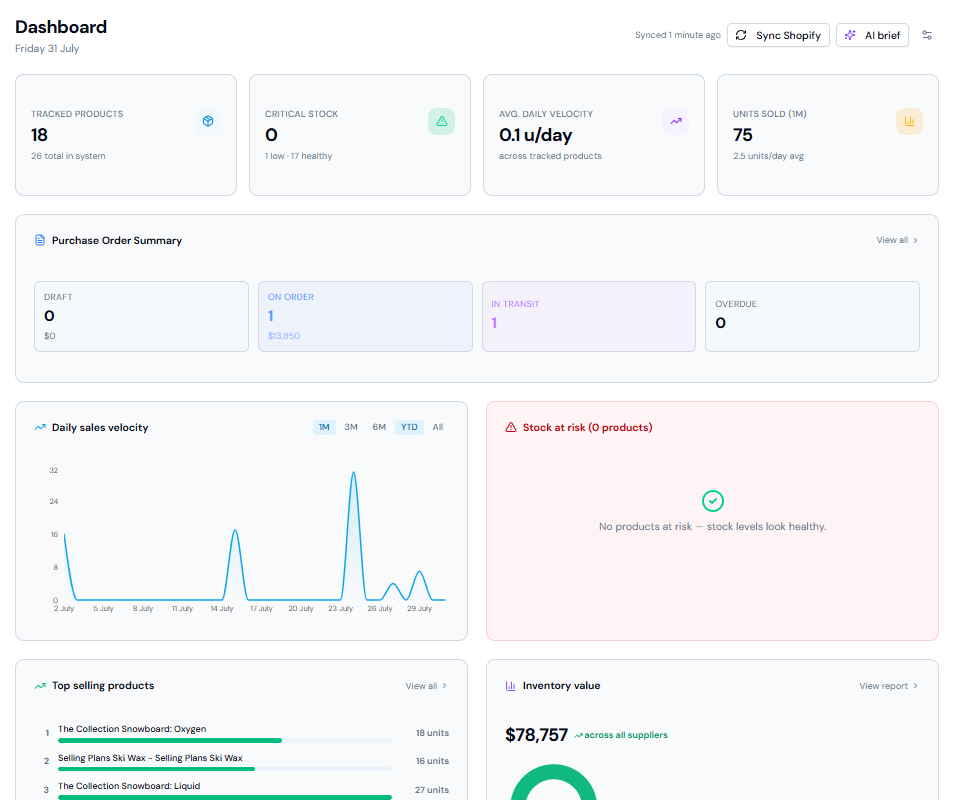
See inventory risk in the language of time, not just quantity

StockSense turns on-hand quantities into days of cover, daily sales velocity and stockout risk. The dashboard keeps critical, low and healthy products visible without digging through Shopify reports.

The problem

You find out you're out of stock when a customer complains — not before. Shopify tells you quantities, not how long they'll last.

Why this is useful

Your dashboard shows days of stock remaining, daily sell rate and the products that need action, so the team can prioritise a replenishment decision before the product is unavailable.

02 · Forecast

Forecast demand with context you can inspect

Stock Projection separates the normal in-stock sales baseline from historical seasonal uplift and planned sale uplift. It then shows on-hand, incoming stock, projected run-out and reorder context for one tracked SKU.

The problem

You're guessing reorder quantities based on gut feel or last month's numbers — not what's actually selling right now.

Why this is useful

Forecasts use your own Shopify sales history rather than opaque cross-merchant assumptions. You can see whether the recommendation is driven by normal demand, comparable seasonal demand, a planned sale, or incoming stock.

Stock Projection — 90 day view
Projected inventory position chart showing stock declining below the reorder point after a purchase order arrives
03 · Purchasing

Manage purchase orders from draft to delivery

Create POs in seconds, assign them to suppliers, and track every order through Draft → On Order → In Transit → Arrived. Lead times are automatically calculated and fed back into your reorder suggestions.

The problem

Purchase orders live in spreadsheets or email threads. You have no idea what's on order, what's overdue, or how much you owe suppliers.

Why this is useful

Create POs, email them to suppliers, record expected arrivals and track them through to receipt. On-order quantities stay visible in Stock Projection so you do not raise a duplicate order for stock already inbound.

04 · Sale planning

Plan for sales events without overstocking

Black Friday, seasonal peaks, and promotions throw off your usual velocity — and most tools don't account for them.

The problem

You either run out during your biggest sale of the year, or you over-order and sit on dead stock for months afterwards.

Why this is useful

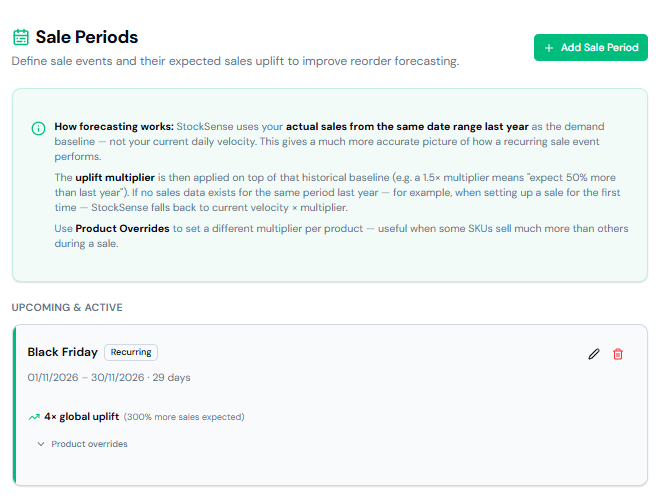
Define sale periods with an uplift multiplier, then combine that planned uplift with comparable historical seasonal demand. The forecast shows the components separately, so you can understand why the recommended quantity changed.

Sale Periods
Sale Periods screen with a recurring Black Friday event set to a 4x global uplift
05 · Reorder point

Use supplier lead times and safety stock to set a better reorder point

StockSense can recommend a reorder point from forecast daily demand during the supplier lead time plus safety stock. It does not silently overwrite a merchant’s setting: the recommendation is explained and applied only when approved.

The problem

A fixed reorder point quickly becomes stale when sales accelerate, a supplier’s lead time changes or a sale is approaching.

Why this is useful

The recommendation makes its assumptions visible: forecast demand, lead time and safety stock. You keep control over the final setting while removing repetitive spreadsheet calculations.

06 · Stocktake

Run stocktakes with compatible barcode scanners or typed SKUs

In a draft Stocktake, a compatible USB or Bluetooth scanner can enter Shopify barcode values or SKUs. Each scan safely increments the saved draft count, so a refresh does not restart the product at one.

The problem

Manual physical counts are slow, error-prone and easy to confuse with a live Shopify inventory adjustment.

Why this is useful

Scan into a draft count, review the variance, then choose when to submit. Shopify inventory is not changed by scanning; it changes only after the merchant confirms the completed stocktake.

07 · Value

Understand inventory value and the cost of stockouts

Inventory Value provides product-level retail and cost-value context. Lost Revenue reporting estimates the units and revenue at risk when an otherwise selling product is unavailable.

The problem

Inventory is often treated as a single total, while the cost of an out-of-stock product remains invisible until after the opportunity has passed.

Why this is useful

See which products tie up value and which stockouts matter most, so purchasing attention is directed toward the decisions with the clearest commercial consequence.

08 · Focus

Keep planning focused on the products you actively manage

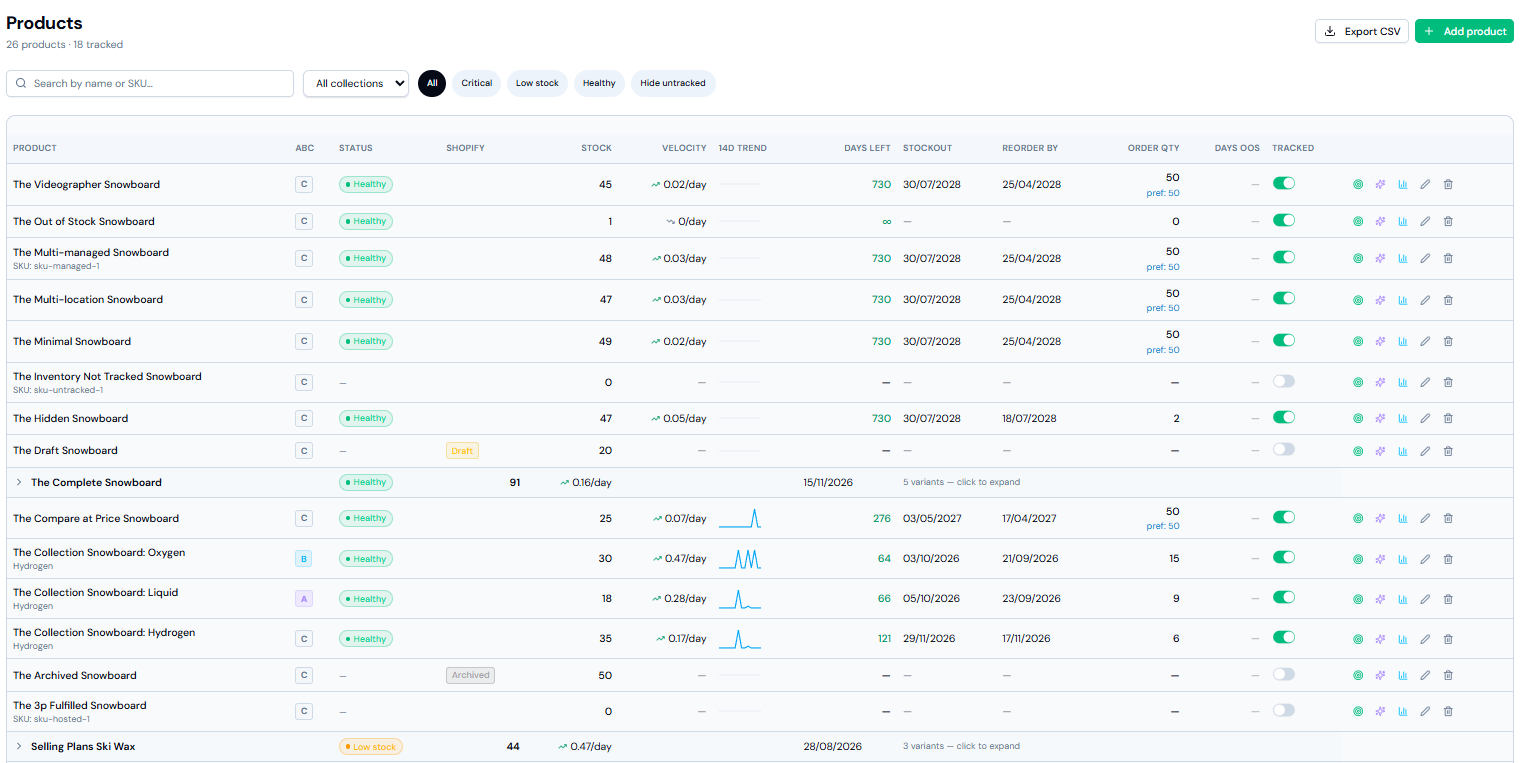
Choose which products are tracked, keep those preferences through Shopify product syncs, and use the AI Brief to surface the inventory, inbound-stock and risk context worth reviewing.

The problem

Large catalogues bury the products that need attention under slow-moving or intentionally untracked items.

Why this is useful

Planning views can focus on tracked products and their inbound purchase orders, making the workflow useful for teams that need practical replenishment decisions rather than another full ERP.

Dashboard — AI inventory brief
AI inventory brief summarising health score, top three actions for today and the biggest risk this week

Every forecast has an explanation

StockSense is deliberately built around the merchant’s own operating data. It does not claim to predict consumer trends from a cross-merchant data pool. Instead, it makes the inputs to a SKU-level decision visible.

Forecast componentWhat StockSense usesWhy it matters
Normal demandIn-stock Shopify sales velocityEstablishes the baseline rate without treating stockout days as weak demand.
Historical seasonalityComparable prior-year sales periods when availableRaises demand only when relevant historical demand is stronger than the current baseline.
Planned sale upliftYour sale-period multiplierLets the team plan explicitly for a promotion instead of hiding an assumption inside one forecast number.
Supply contextOn-hand, incoming PO quantity, supplier lead time and safety stockConnects demand to a practical reorder point and order timing decision.
Why StockSense

Inventory intelligence,
built for Shopify.

Designed for Shopify merchants who want to stay ahead of stockouts without spending hours in spreadsheets.

Syncs directly with Shopify

Products, variants, and inventory levels pulled straight from your store. No CSV imports, no manual entry.

Alerts before stockouts happen

Set reorder thresholds once. StockSense alerts you when stock drops below the point of no return.

Your data stays yours

StockSense only reads the inventory data it needs. No selling, no sharing, no surprises.

Up and running in minutes

Install from the Shopify App Store, sync your products, and your dashboard is live. No setup calls, no onboarding fees.

Barcode-supported stocktakes

Use a compatible scanner to match Shopify barcode or SKU values, increment draft counts, and review variances before you submit.

Pricing

Simple, transparent pricing.

All plans include a 14-day free trial. Billed monthly through your Shopify account — no separate credit card required.

Starter

$19

/month

  • Up to 10 tracked products
  • Daily velocity tracking
  • Reorder alerts
  • Purchase order management
  • Supplier management
  • 14-day free trial
Available now on Shopify
Most popular

Growth

$49

/month

  • Unlimited tracked products
  • AI forecasting & reorder suggestions
  • Email alerts for low stock
  • Velocity trend reports
  • Lost revenue analysis
  • 14-day free trial
Available now on Shopify

Pro

$99

/month

  • Everything in Growth
  • Sale period management
  • Per-product uplift overrides
  • ABC product classification
  • Supplier performance reports
  • Priority support
  • 14-day free trial
Available now on Shopify
FAQ

Questions before you install?

Here are the ones we hear most.

Yes. StockSense installs from the Shopify App Store and works with all Shopify plans — from Basic through to Plus.
StockSense pulls your order history from Shopify and calculates how many units of each product you sell per day. This is used to estimate how many days of stock you have remaining and when you should reorder.
Only when you mark a purchase order as Arrived. StockSense then pushes the received quantity back to Shopify as an inventory adjustment. All other stock changes happen in Shopify as normal.
Yes. You can create supplier profiles, assign products to suppliers, set lead times, and track supplier performance over time.
At the end of your trial you can choose a plan and continue. Billing is handled entirely through Shopify — no separate credit card required.
There is no permanent free tier, but every plan includes a 14-day free trial with no credit card required.
Our story

We learnt the cost of a stockout the hard way.

When we launched our own e-commerce brand, we thought we had inventory under control.

We knew what was selling. We knew how much stock we had. But what we couldn't easily see was how quickly that stock was moving, how long it would last, and when we actually needed to reorder.

The result?

Stockouts cost us more than $20,000 in lost sales.

And it wasn't because we weren't paying attention. The problem was that looking at your current Shopify stock level only tells you part of the story.

Knowing you have 200 units left doesn't mean much without knowing whether you're selling 2 a day or 20 a day.

Then add supplier lead times, seasonal demand, promotions and major sale periods like Black Friday, and suddenly a spreadsheet and a quick look at Shopify aren't enough.

That's why we built StockSense.

StockSense looks beyond how much stock you have today and helps you understand how long it's actually going to last.

It uses your sales data to calculate daily sales velocity, so you can see how quickly each product is moving and when you're likely to run out.

Then you can plan for the moments when normal sales velocity isn't enough.

$20,000

Lost sales from stockouts in our own brand — the lesson that became StockSense.

Your sales aren't the same every day of the year.

StockSense lets you account for:

Daily sales velocity

Understand the real rate each SKU is selling and how many days of stock you have left.

Seasonal uplift

Expecting demand to increase during a particular season? Build that uplift into your forecast instead of relying on your normal sales rate.

Sale period uplift

Planning Black Friday, EOFY or another promotion? Forecast the additional demand so your best sellers don't disappear halfway through your campaign.

Combined with your supplier lead times and incoming stock, StockSense helps you answer the questions we couldn't easily answer when we launched:

When will I run out?

When do I need to reorder?

How much should I order?

Because running out of your best seller doesn't just mean an empty shelf.

It means sales you can't get back.

We built StockSense so growing Shopify brands can make inventory decisions earlier, order with confidence and avoid learning the $20,000 lesson we did.

Know when to reorder
before you run out.

StockSense is now available in the Shopify App Store.

Available now on Shopify

Start your 14-day free trial through Shopify.